A guide for Business Central partners
Power BI for Business Central: what the free apps do, and where they stop
Microsoft publishes nine Power BI apps for Business Central, free to install, with 117 report pages between them. For a lot of clients they are the right place to start. They also have limits Microsoft documents itself, and a bigger gap no template can close: they report what happened and leave the decision to whoever is reading.
By Josh Elberg · Updated · Every Microsoft limit is quoted and linked
The short answer
- 1Nine template apps, free to install, covering finance, sales, purchasing, inventory, manufacturing, projects and more.
- 2One company per app, online only, and every user needs a Power BI Pro licence.
- 3They show what happened. They do not tell anyone what to do about it.
What is in the box
Nine apps, 117 report pages
Microsoft calls them template apps. Each pairs a Power BI semantic model and report set with a connector app that is already installed in Business Central. Report pages per app:
- Sales21
- Manufacturing18
- Purchasing17
- Finance15
- Subscription Billing14
- Inventory11
- Sustainability10
- Projects8
- Inventory Valuation3
Counted from Microsoft's apps by functional area (opens in a new tab) page. Microsoft's own Inventory app page lists two more (13).
Setup runs through the Connect to Power BI assisted setup in Business Central, where you pick a fiscal, standard or weekly calendar (445, 454 or 544). The reports can be embedded on Role Centers and list pages, and since Microsoft open-sourced the apps, the report files can be downloaded and changed.
Where they stop
Seven limits, in Microsoft's own words
None of these is a criticism of the apps. They are what Microsoft's documentation says, and each one is a conversation a partner ends up having with a client after go-live.
01
One company per app
Three legal entities means three installs of every app, and no consolidated view.
Each company gets its own install and its own workspace. Nothing in the box rolls them up.
Microsoft's wording
“The Power BI apps currently work per company in Business Central. If you have multiple companies in your Business Central environment, you must install and set up a Power BI template app for each company.” Microsoft Learn (opens in a new tab)
02
The OData workaround fails too
A home-built cross-company report on the OData feed hits the same wall.
A consolidated view needs a model that brings each company's data together on purpose.
Microsoft's wording
“ODataV4 doesn't export data from multiple companies. The $expand function in Power BI that you might think would be an alternative way to create a multi-company report can't be used either.” Microsoft Learn (opens in a new tab)
03
Online only
A client on premises, or mid-migration, gets nothing from the apps.
The apps are only published for Business Central online.
Microsoft's wording
“Are the apps available for on-premises installations? No. Power BI apps are only available for online environments.” Microsoft Learn (opens in a new tab)
04
Free apps, paid licences
Everyone who installs, refreshes or reads the reports needs Power BI Pro.
The alternative is Premium capacity. The free Power BI licence is ruled out.
Microsoft's wording
“The free license alternative does not work with the Power BI apps.” Microsoft Learn (opens in a new tab)
05
Blank dimension slicers
If one job queue entry stops, every report sliced by dimension goes blank.
The apps read dimensions from their own flattened table, which a job queue entry keeps current.
Microsoft's wording
“All Power BI semantic models read dimension records from PowerBI Flat Dim. Set Entry (Table 36954). This is a different table from the standard Dimension Set Entries table.” Microsoft Learn (opens in a new tab)
06
Budgets get cut off
A budget running past the accounting periods drops out of budget versus actual.
The date table stops where the Account Period table stops until someone extends it.
Microsoft's wording
“If your budgets extend past the last date in your Account Period table, you must manually set the ending date to accommodate the extended range.” Microsoft Learn (opens in a new tab)
07
Customisations can be overwritten
Edit the template workspace and the next app update can undo it.
Keeping customised copies in a separate workspace avoids that. Somebody has to design it.
Microsoft's wording
“When you update a template app, it's important that you're aware of your options and how they might overwrite earlier changes to the reports.” Microsoft Learn (opens in a new tab)
A client stuck on one of these?
Send me a page of their reporting and I'll tell you what it cannot answer yet, and what it would take.
Send me a client reportThe bigger gap
Reporting the number is not the job
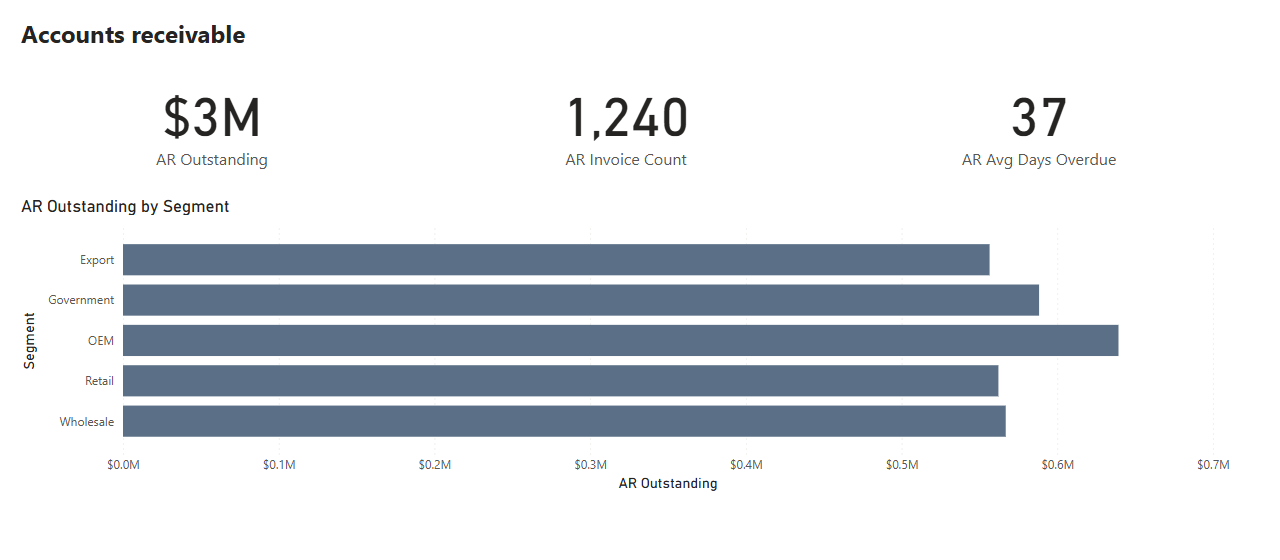
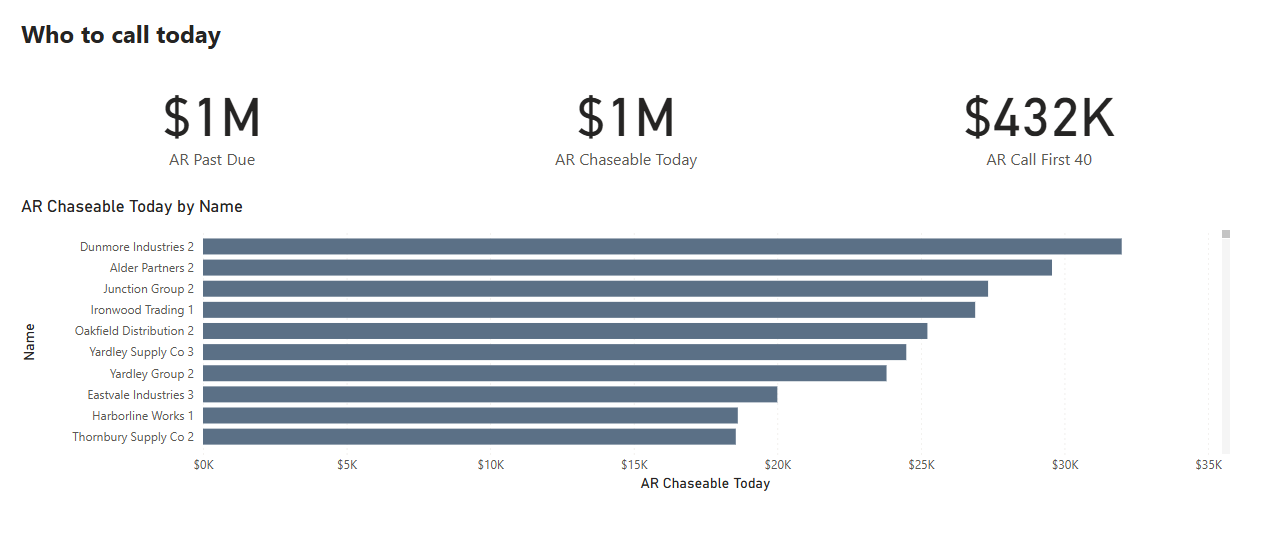
Every limit above can be engineered around. This one is built into what a template is. A template has to work for every business, so it cannot know what counts as short for this client, what their margin floor is, or which rows a metric should never have counted. Those are the rules a decision depends on, and someone at the business has to agree them.
What a receivables report shows
What the client needs
Live Power BI reports · synthetic demo data · not client data
Three dashboard examples
Inventory
The free app: ABC class and quantity on hand.
What the client needs: Which items to reorder this week, given what is on order, what is committed and the supplier's lead time.
Finance
The free app: Aged receivables by bucket.
What the client needs: Which customers to call today, in order, and what is at stake if nobody does.
Sales
The free app: Orders and revenue by customer and item.
What the client needs: Which open orders will ship short, and which customer should hear it before they find out.
For Business Central partners
Your client asks for more. You bill it.
I build that decision layer for implementation partners who do not keep a reporting bench: the model, the measures and the pages, in the client's tenant, as a fixed piece under your name. You bill it, keep the margin and keep the client, with no hire and nobody on the bench between projects.
I have never done an implementation and I am not about to start, so I am never competing with you.
Send a page of a client's reporting and I'll tell you what it cannot answer yet.
Running Business Central yourself? Your implementation partner is the right first call. Send them this page.
Common questions
What partners and clients ask
Is Power BI for Business Central free?
The nine Power BI apps Microsoft publishes for Business Central are free to install. The Power BI licences are not: the person who installs them, the person who refreshes them and everyone who opens the reports need Power BI Pro, or the organisation needs Premium capacity. Microsoft's FAQ states that the free Power BI licence does not work with the apps.
Can the Business Central Power BI apps report across multiple companies?
No. Microsoft's FAQ says the apps work per company, so each company needs its own install and workspace. Building a multi-company report directly on the OData feed does not work either, because OData v4 does not export data from multiple companies. A consolidated view needs a model that brings each company's data together on purpose.
Do the Power BI apps work with Business Central on-premises?
No. Microsoft states the Power BI apps are only available for online environments.
Why are the dimension slicers empty in my Business Central Power BI reports?
The apps read dimensions from the PowerBI Flat Dim. Set Entry table (36954), not the standard Dimension Set Entries table. That table is filled by the Update Dim. Set Entries job queue entry. If the job has not run, dimension-sliced reports come back empty.
Can I customise the Business Central Power BI templates?
Yes. Microsoft has open-sourced the apps and the report files can be downloaded from an installed app. The catch is upgrades: Microsoft warns that updating a template app can overwrite earlier changes, and suggests keeping customised copies in a separate workspace from the template.
What do the free apps not do?
They report what happened. They do not decide what to do about it: which items to reorder this week, which customers to call first, which orders will ship short. That layer depends on rules someone at the business has to agree, such as what counts as short and what the margin floor is, so no template can ship it.
Josh Elberg · Palavir. Seven years of analytics at The Home Depot, then data strategy at Merkle, analytics at MRM, and Senior Director of Data Transformation at Practising Law Institute. Power BI, Fabric, Tableau. Detroit, remote across the US and Canada.